Showing posts with label 3-Learning Environments. Show all posts
Showing posts with label 3-Learning Environments. Show all posts
Sunday, 14 December 2014

Thursday, 31 July 2014
Arguing for PBL
Situated Cognition. Brown, Collins and Duguid (1989, p. 34), point out that although students are shown the tools of many academic cultures in their school career, these cultures are that of schools, and not the actual domain for which the tools are to be used. Students may pass exams but still not be able to use the skills and tools of the domain. Students need to be exposed to domain learning and the tools of the domain on authentic activities.
Brown, J. S., Collins, A., & Duguid, P. (1989). Situated cognition and the culture of learning. Educational Researcher, 18(1), p32-42.
Friday, 2 May 2014
Assistive Technologies in Biology
ASsistive Technologies in Biology
Students with Cognitive Difficulties
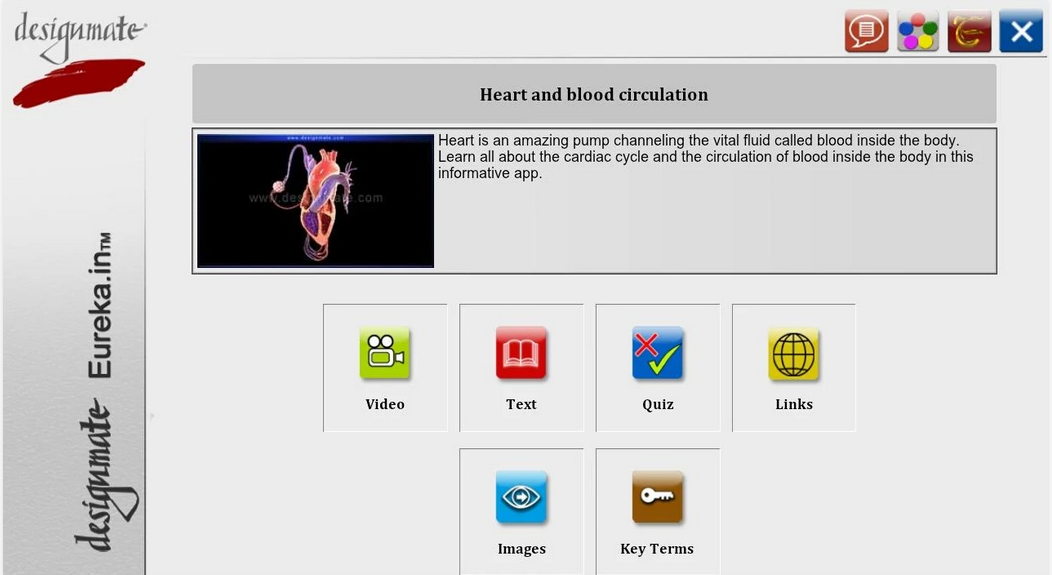
Apps such as Designmate’s Heart and Blood Circulation bring multimedia content, images, videos, screen readers, audio, quizzes with feedback, and key term glossaries together into one place. Students with cognitive processing difficulties can use the various media to enable them to access the biological content.

e-Bug is a digital learning environment that is animated and fun to navigate. Microbes are everywhere in the site and there are some very nice activities to do in and out of class. Quizzes and Games make this a great site for students with knowledge retention issues. The site is differentiated by the UK key stages; the earlier contact can be accessed by older students in order to help scaffold their knowledge.
Websites can be blocked, monitored for time, even keywords can be "turned off" during set times each day. If needed, you can set certain sites for time spent and add them to sets to block or unblock. Individuals that struggle to maintain concentration
Readers can control the text-to-speech in the books that MeeGenius is available for. The control offers students with processing disorders the chance to access the text at their own rate.
Students with Physical Difficulties
The virtual microscope benefits individuals with an array of difficulties. The site reads the the instructions and has a large image of a microscope that is easy to see. The instructions link with arrows and highlights to draw attention to the microscope. Individuals with limited movement but can access a mouse can learn to use the microscope.

Carolina’s digital microscopes have LED screens attached to the top of the device enabling the user to see the image of the slide without having to stand over the microscope; idea for wheelchair bound students. The microscope can be hooked up to a screen or projector to provide even larger viewing for those students who have trouble seeing the detail on the LED screen.
Google Voice allows students with motor skills impairments to access the search functionality of Google on a Chrome browser to enter search queries. The translation is remarkably accurate and is very fast.
Speak-It is a Chrome extension that reads multiple languages in male and female voices. German, French, Spanish, Italian, Russian, Chinese, etc.
This extension can be used for visually impaired individuals from these international backgrounds.
This extension could also be used to give Gifted and Talented language students listening tasks from native language web articles.
Students with Sensory Difficulties

Chromevox was developed by Google to provide accessibility tools native on the Chrome OS. It has a screen reader that can read single letters up to full paragraphs and is ideal for individuals with visual impairment. The speech can be altered in pitch and speed making the voice easier to listen to - lower pitch sounds older while higher sounds younger - the listener can choose the voice type they associate best with.
For unimpaired individuals that want to listen but can do so at a faster rate of speech, speeding up the speech can be achieved with this extension.
The page contains several links for webpage accessibility for the visually impaired. The page has been assessed at the highest level of high contrast colours.
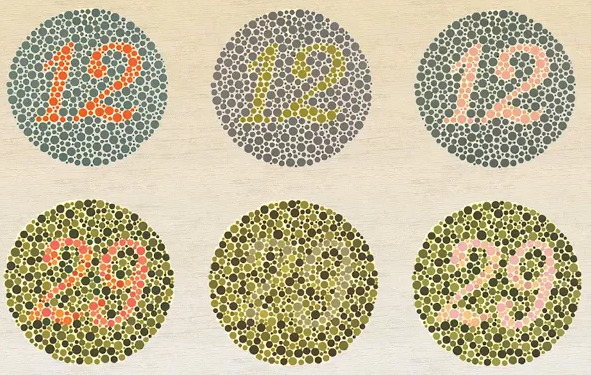
Daltonize is an extension that enhances colour contrast on webpages in order to allow colour blind individuals (tritanope, deuteranope and protanope) to tell the difference in colours. In the Biology class, this extension can also be used to simulate what colour blind individuals perceive; teachers can use the extension to develop material that use colours that work to generate the best contrast.
At-Risk Students
Careers

The ASPIRES site brings students into contact with careers in science. The lessons and activities are designed to give students the opportunity to see the possibilities beyond their immediate situation and motivate them to lift themselves out of their situation. The site has 11 case study lessons that help students take on the role of scientists.
Videos/TV shows and YouTube: Brainiac Science Abuse
There is much in science that cannot be replicated in the laboratory. Some Biology can be a bit “boring” and boredom can lead to misbehaviour by those students who, for whatever reason, are unable to focus in class. Targeted use of exciting media like Brainiac and Richard Hammond’s Miracles of Nature will help to allow troubled/at risk students focus and access the curriculum.
The N-Squad site by RICE university has a module on Alcohol and its effects on the body. This digital animated narrative can be used to engage students from lower socio-economic backgrounds that tend to resort to alcohol abuse. The site educates the learner enabling them to make informed choices in their real life. Alcohol, nicotine and other drugs are embedded in the National Curriculum for Key Stages 3, 4 and 5. While they are considered pastoral issues, the Biology teachers address the “mechanics” of the drugs in the Biology class.
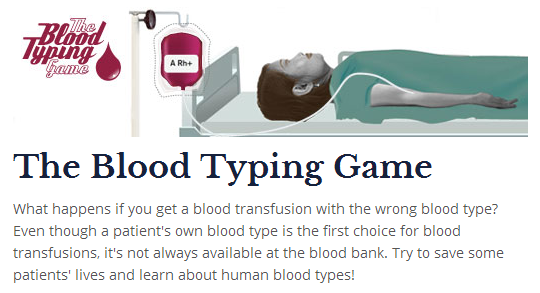
The Nobel prize site provides games and animations that students can use and play to follow in the footsteps of the Nobel Prize winners of the past. Some schools will not permit blood in the classroom which can make the topic of blood, which is potentially very interesting, rather boring. Interesting and engaging games such as those offered by NobelPrize.org may be just what the bored and distracted student needs to stay on task.
Zondle and IAmLearning


Zondle and IAmLearning are games platforms with Gamification and Games As Rewards mechanics built into them. Science and Biology lend themselves to the types of questions that are available in these platform and “At Risk” students may find these mechanics engaging, allowing them to access the curriculum in a fun way. Students may not realise they are learning while they play and the quizzes record and report to the teachers the students progress avoiding the need for stressful summative tests.
Gifted and Talented Students
Speak-It is a Chrome extension that reads multiple languages in male and female voices. German, French, Spanish, Italian, Russian, Chinese, etc.
This extension could be used to give Gifted and Talented language students listening tasks from native language web articles. It could also be used to assist students in their learning in a second language medium as the voices mimic stereotypical accents well for the language; assisting in the pronunciation of the written word.

This website provides engaging and challenging biology content including simulations, and videos, and online lab activities. Students with strong independent learning skills can access content from Stem Cells to Pharmacogenomics - the activities extend the classroom and allow G+T students take their studies to a university standard thus enhancing their breadth of knowledge at A-Level.
Tuesday, 29 April 2014
Accessibility features on Google Chrome
I am a big fan of Google's Apps. I am aiming at finding an app or extension for Chrome for all of my laptop related activities so that I don't need to rely on a particular platform in future. The extensions on Google Chrome seem to meet the needs I am looking for.
For this post, I have decided to look at the assistive technologies I can find for Google Chrome, Chrome OS and Chromebooks, along with apps/extensions that might be considered assistive. To start with, I tried some Speech-to-Text apps and voice recognition:
For this post, I have decided to look at the assistive technologies I can find for Google Chrome, Chrome OS and Chromebooks, along with apps/extensions that might be considered assistive. To start with, I tried some Speech-to-Text apps and voice recognition:
"I'm trying to test this speech to text app . I'm finding that i have to speak slowly, and pronounce my words very carefully or not recognise the words . speaking this lonely is quite difficult than i don't enjoy doing kama it is making process of getting information into the computer slower and harder than i would be normal the avengers persistently mess recognises my location of the world, c o m n s . I would like to be able to say delete and have the word you said be deleted i still have to use my hands to do that ."
The App that produced this result was Dictation.io; it struggled somewhat with my accent I think! I two things that amused me were: 1) it didn't recognise the word comma in a sentence, 2) didn't recognise period in regards to a lesson. In a effort to get the recognition to realise I didn't want a comma or full stop inserted, I tried to speak quickly through the sentence; this had an effect but the recogition began to struggle with the speed.
I tried saying the same sentences to Google's Voice Search and I found that the recognition here was much more accurate and could deal with my pronunciation!
The SpeakIt extension for Chrome was very impressive. I used it on the various language settings and speakers on the different languages on Wikipedia - I was convinced I was listening to native speakers of the language. Highlighting the text and letting the extension read could be used not only for individuals with visual impairments but for first and second language learners.
The Chromebook comes packaged with an accessibility toolkit called ChromeVox. This is another screen reader that can navigate the browsers menus and can be set to read each letter or the whole paragraph by tapping the keys. What I found most interesting about this app was that it allows the alteration of the speed and pitch of the voice; higher pitches sounded younger and faster speeds allowed the page to be read faster. Depending on preference of the listener for young/old and male/female, a listener can engage more or less based on an environmental predisposition for a voice allowing them to access the content better. Learners with processing speed issues can use the slower speech in order to allow that to access curriculum better. J.J. Meddaugh of the American Association for the Blind comments on Chromevox on the association's site"
"Overall, the browser is able to decipher and present a variety of webpages with relative ease, which is probably one of its strengths when it comes to accessibility."Clearly there is some room for improvement where full accessibility is concerned but Google are on their way to meeting the needs.
"ChromeVox could use some improvements in speaking notifications and progress bars as it often gives no feedback, which can lead to confusion and frustration."
These were the typical app types and extensions available but I am interested in colour blindness as at least one student in each year I have taught over the last 10 years has had the genetic condition in some form. From my investigations, Microsoft and Apple do not have specific colour blind accessibility options so having the ability to enhance Chrome with Daltonize seems useful. The extension can be applied to a webpage and it will enhance the contrast of the colours that each of the three main colour blindness types need in order to better see the differences in colours: protanope, deuteranope and tritanope. I visited various image and colour heavy sites and tried out the extension; my student will test it to see if it helps him!
References
Meddaugh, J.J. (2013). A First Look at the Accessibility of the Google Chrome Operating System. Retrieved from: http://www.afb.org/afbpress/pub.asp?DocID=aw140502
Tuesday, 11 February 2014
Monday, 23 December 2013
Final Instructional Design Project: ePortfolio and Target Setting Google Site
In the ePortfolio site below, the instruction materials for the ID project are built and presented in the Help page. The other pages in the site are for the students to use for their evidence and it is the instructional materials in the help page that provide them with the info they need to edit a Google Site.
Videos were built in alignment with Multimedia Design Principles (Clark, R. C., & Mayer, R. E. (2008)), and the pace of the YouTube demos are appropriate and uses an appropriately “conversational” style.
View the full site here.
Videos were built in alignment with Multimedia Design Principles (Clark, R. C., & Mayer, R. E. (2008)), and the pace of the YouTube demos are appropriate and uses an appropriately “conversational” style.
View the full site here.
Saturday, 14 December 2013
ID Formative Evaluation
The evaluation plan outlined is based on Kirkpatrick’s Four-Level Evaluation model on page 11 of Streamlined ID (Larson & Lockee, 2014).
Friday, 13 December 2013
Monday, 21 October 2013
Monday, 12 August 2013
Webquest
http://edtech2.boisestate.edu/martinmullan/502/webquest/start.html
The Webquest, made popular by Bernie Dodge, is a structured learning environment for students to find resources that support the production of an object for their learning. In this case, the theme of the webquest is Animal Testing.
The "Triple Impact" self/peer/teacher assessment is a powerful pedagogical tool for enhancing the students work. Reflection and feedback at multiple times throughout the process increases the quality of the final product. Ertmer points out that "Students noted that peer feedback can be valuable and, more importantly, described how giving peer feedback not only reinforced their learning but enabled them to achieve higher understanding" (Ertmer, 2007)
This was the final object I created in this module and encompasses all the elements of the other modules; accessible and responsive design, with appropriate copyright usage demonstrated.
I find the webquest structure itself useful, but elements of it are somewhat redundant and repetitive. In the future when I create a webquest, I will not include all of the elements as a result of my learning on this task i.e. the introduction, task and process pages can all be one, and the teacher page does not have to be included for the students to see.
Ertmer, P. A., Richardson, J. C., Belland, B., Camin, D., Connolly, P., Coulthard, G., et al. (2007). Using peer feedback to enhance the quality of student online postings: An exploratory study. Journal of Computer‐Mediated Communication, 12(2), 412-433.
The Webquest, made popular by Bernie Dodge, is a structured learning environment for students to find resources that support the production of an object for their learning. In this case, the theme of the webquest is Animal Testing.
The "Triple Impact" self/peer/teacher assessment is a powerful pedagogical tool for enhancing the students work. Reflection and feedback at multiple times throughout the process increases the quality of the final product. Ertmer points out that "Students noted that peer feedback can be valuable and, more importantly, described how giving peer feedback not only reinforced their learning but enabled them to achieve higher understanding" (Ertmer, 2007)
This was the final object I created in this module and encompasses all the elements of the other modules; accessible and responsive design, with appropriate copyright usage demonstrated.
I find the webquest structure itself useful, but elements of it are somewhat redundant and repetitive. In the future when I create a webquest, I will not include all of the elements as a result of my learning on this task i.e. the introduction, task and process pages can all be one, and the teacher page does not have to be included for the students to see.
Ertmer, P. A., Richardson, J. C., Belland, B., Camin, D., Connolly, P., Coulthard, G., et al. (2007). Using peer feedback to enhance the quality of student online postings: An exploratory study. Journal of Computer‐Mediated Communication, 12(2), 412-433.
Monday, 5 August 2013
Virtual Field Trip
http://edtech2.boisestate.edu/martinmullan/502/start.html
The Virtual Field Trip is a series of linked pages with different activities on each. Students navigate through the site completing the activities and do the research at the proposed sites; it is somewhat like a webquest but tries to "take" students to the real-world places they are studying, virtually!
I have embedded a specifically designed Google Map, a Mindmeister MindMap, and a YouTube clip. The various media and interactivity make this learning object engaging and a challenge to complete.
The Virtual Field Trip is a series of linked pages with different activities on each. Students navigate through the site completing the activities and do the research at the proposed sites; it is somewhat like a webquest but tries to "take" students to the real-world places they are studying, virtually!
I have embedded a specifically designed Google Map, a Mindmeister MindMap, and a YouTube clip. The various media and interactivity make this learning object engaging and a challenge to complete.
Thursday, 1 August 2013
Mobile Learning
http://edtech2.boisestate.edu/martinmullan/502/mlearning.html
The mobile learning task was not required for the course but I did it anyway. Using Dreamweaver's responsive template designs I was able to adapt my other CSS stylesheets to be mobile compatible. The responsive design works well in PC, tablet and smartphone sized screens, enabling students to access the info as efficiently as possible while studying offsite.
The best practice of creating a resource that fits the most devices possible iin order to enhance accessibility is highlighted by this object.
The mobile learning task was not required for the course but I did it anyway. Using Dreamweaver's responsive template designs I was able to adapt my other CSS stylesheets to be mobile compatible. The responsive design works well in PC, tablet and smartphone sized screens, enabling students to access the info as efficiently as possible while studying offsite.
The best practice of creating a resource that fits the most devices possible iin order to enhance accessibility is highlighted by this object.
Monday, 29 July 2013
Jigsaw
http://edtech2.boisestate.edu/martinmullan/502/Jigsaw.html
Elliot Aronson, the creator of the Jigsaw activity describes it as this: Jigsaw is a cooperative learning technique rich in opportunities for promotive interaction (Aronson, 2008).
The Jigsaw activity is an excellent pedagogical group work strategy where students initially assign themselves to do research on part of the whole task. They split up and work with other students from different groups also researching the same topic to become "experts". These secondary groups decide how to teach the content to their "home" group and then give a presentation.
A short quiz is given at the end of the session to ensure the students have taken onboard the learning objectives and have taken the activity seriously.
Aronson, E. (2008). Jigsaw classroom. Retrieved July 29, 2013 from http://www.jigsaw.org/
Elliot Aronson, the creator of the Jigsaw activity describes it as this: Jigsaw is a cooperative learning technique rich in opportunities for promotive interaction (Aronson, 2008).
The Jigsaw activity is an excellent pedagogical group work strategy where students initially assign themselves to do research on part of the whole task. They split up and work with other students from different groups also researching the same topic to become "experts". These secondary groups decide how to teach the content to their "home" group and then give a presentation.
A short quiz is given at the end of the session to ensure the students have taken onboard the learning objectives and have taken the activity seriously.
Aronson, E. (2008). Jigsaw classroom. Retrieved July 29, 2013 from http://www.jigsaw.org/
Monday, 15 July 2013
Digital Inequality
Over the last week I have been on a school trip to Phuket, Thailand. Every time I go to Thailand it amazes me how rice farmers can pull out a smart phone and happily text away, or how it is possible to pay for your Air Asia flights, along with all your other bills, in 7 Eleven. The Thai technology infrastructure is pretty good despite their 91st placing by the ITU last year!
Initially I was intending to do my piece as a comparison of the strategies Thailand and Malaysia have put in place to bridge their digital divides with regards to broadband access and to bring themselves inline with the international agreements for 2015. However, a discussion with a colleague on the trip, when they said they needed to figure out Google Docs, was what triggered me to think about the issues with our staff as a whole. Since all of our students have their own devices and can bring them to school if they wish, their techie skills are high. They are autonomous. What they don't do so well is use the technologies available to them to enhance their learning, and this is due to the teachers not exposing them to the plethora of awesome apps and websites available to them.
Just like what Anthony has done for us with the use of these different web apps, the exposure to the technology needs to be greater. Of course, teachers will complain about not having enough time therefore whatever strategies are put in place, they need to target as many individuals as possible so as the 'don't have time' excuse becomes superfluous.
I mention Digital Literacy in my second to last slide. This is an issue I wish to look into further and hopefully provide some guidance for the improvement of at my school with the help of our librarian.
Initially I was intending to do my piece as a comparison of the strategies Thailand and Malaysia have put in place to bridge their digital divides with regards to broadband access and to bring themselves inline with the international agreements for 2015. However, a discussion with a colleague on the trip, when they said they needed to figure out Google Docs, was what triggered me to think about the issues with our staff as a whole. Since all of our students have their own devices and can bring them to school if they wish, their techie skills are high. They are autonomous. What they don't do so well is use the technologies available to them to enhance their learning, and this is due to the teachers not exposing them to the plethora of awesome apps and websites available to them.
Just like what Anthony has done for us with the use of these different web apps, the exposure to the technology needs to be greater. Of course, teachers will complain about not having enough time therefore whatever strategies are put in place, they need to target as many individuals as possible so as the 'don't have time' excuse becomes superfluous.
I mention Digital Literacy in my second to last slide. This is an issue I wish to look into further and hopefully provide some guidance for the improvement of at my school with the help of our librarian.
Accessibility
http://edtech2.boisestate.edu/martinmullan/502/accessibility.html
Accessibility is about designing web pages that provide content that is available to the greatest number and type of devices, be they keyboards, screen readers, mobile devices or for low bandwidth connections. It is also equally important that the greatest variety of people are given access to the content of the page. It is the law that designers meet the standards set out in Section 508 of the Rehabilitation Act. These standards are summarized on the WebAIM 508 check list page.
Accessibility is about designing web pages that provide content that is available to the greatest number and type of devices, be they keyboards, screen readers, mobile devices or for low bandwidth connections. It is also equally important that the greatest variety of people are given access to the content of the page. It is the law that designers meet the standards set out in Section 508 of the Rehabilitation Act. These standards are summarized on the WebAIM 508 check list page.
I particularly enjoyed testing my page for color contrast and for access by individuals with different types of color blindness. One of my students is purple/blue color blind and this drove me to produce the most attractive but accessible design I could.
I also found the challenge of ensuring that my pages are accessible on as many browsers as possible fun. The websites analyse your design and find any errors. All of my pages are certified for HTML5 and CSS3 compliance.
Monday, 8 July 2013
Netiquette
http://edtech2.boisestate.edu/martinmullan/502/netiquette.html
Netiquette is a set of rules that outlines socially acceptable behavior when you are communicating online. Students need to be taught how to behave and how to keep themselves safe online; this webpage highlights my ability to create HTML5 and CSS webpages but also the rules and guidelines I foster in my students.
Netiquette is a set of rules that outlines socially acceptable behavior when you are communicating online. Students need to be taught how to behave and how to keep themselves safe online; this webpage highlights my ability to create HTML5 and CSS webpages but also the rules and guidelines I foster in my students.
Friday, 5 July 2013
Edtech Challenges
This was a tricky one; go safe with a website I have used before or go for a new tech and maybe make a mess of it! Why bother playing it safe when I am on this course to learn new stuff?- Muvizu it will be. After four failed download attempts I finally got it to work. I watched the tutorials and thought, "hey this is pretty cool". The thing is, I've seen applications like this before and there is no way I would master it in 4 days, especially when my computer is overheating trying to run the 3D graphics! I tried to replicate the tutorials and couldn't make my character move! I decided there that the application deserved more time than I could afford to give it in this instance and I promptly uninstalled it!
Since I have used Goanimate before, I decided to try Powtoon. I like this. A web app that permits the upload of .swf files; I'll be able to use that later! Pretty straight forward app right up until I realized that the voice-over had to be one continuous file; the slides don't accept separate audio files. I had to rethink how I was going to work. I downloaded Audacity and the Lame add-on to permit the export of mp3 files. It took a fair bit of creative editing but I think I managed to sync the slides reasonably well.
I chose element 6 of the significant challenges because it is a challenge I am actually facing at the moment. Every character in my animation is real at my school. The pastoral team are looking for a dynamic solution to target setting that links with the eportfolio and reflective writing the Sixth Form students have to do for the AQA Baccalaureate. Unfortunately, as a librarian colleague of mine pointed out in a paper he is about to publish, the British education system isn't very good at assessing 21st Century Skills.
I did some brief research but found this is an area my school definitely needs to look at. The International Baccalaureate (IB) seems to have this kind of assessment of the the students activities away from the classroom done rather well with the Creativity, Action, Service elements of their course. As a Duke of Edinburgh facilitator I am aware of IB schools employing the Duke of Edinburgh as part of their CAS offerings. This makes a lot of sense. Interestingly, we have this programme at our school but the skills of planning, organizing and leadership are not developed further in the school. I think I might try to change this, and with it, implement a more rounded assessment of the students skills and abilities; perhaps we should just do IB!
Since I have used Goanimate before, I decided to try Powtoon. I like this. A web app that permits the upload of .swf files; I'll be able to use that later! Pretty straight forward app right up until I realized that the voice-over had to be one continuous file; the slides don't accept separate audio files. I had to rethink how I was going to work. I downloaded Audacity and the Lame add-on to permit the export of mp3 files. It took a fair bit of creative editing but I think I managed to sync the slides reasonably well.
I chose element 6 of the significant challenges because it is a challenge I am actually facing at the moment. Every character in my animation is real at my school. The pastoral team are looking for a dynamic solution to target setting that links with the eportfolio and reflective writing the Sixth Form students have to do for the AQA Baccalaureate. Unfortunately, as a librarian colleague of mine pointed out in a paper he is about to publish, the British education system isn't very good at assessing 21st Century Skills.
I did some brief research but found this is an area my school definitely needs to look at. The International Baccalaureate (IB) seems to have this kind of assessment of the the students activities away from the classroom done rather well with the Creativity, Action, Service elements of their course. As a Duke of Edinburgh facilitator I am aware of IB schools employing the Duke of Edinburgh as part of their CAS offerings. This makes a lot of sense. Interestingly, we have this programme at our school but the skills of planning, organizing and leadership are not developed further in the school. I think I might try to change this, and with it, implement a more rounded assessment of the students skills and abilities; perhaps we should just do IB!
Tuesday, 11 June 2013
AECT Standards 2012: Learning Environments
AECT Standard 3 - Learning Environments:
Candidates facilitate learning (p. 41) by creating, using, evaluating, and managing effective learning environments. (p. 1)
Indicators:
• Creating - Candidates create instructional design products based on learning principles and research-based best practices. (pp. 8, 243-245, 246)
• Using - Candidates make professionally sound decisions in selecting appropriate processes and resources to provide optimal conditions for learning (pp. 122, 169) based on principles, theories, and effective practices. (pp. 8-9, 168-169, 246)
• Assessing/Evaluating - Candidates use multiple assessment strategies (p. 53) to collect data for informing decisions to improve instructional practice, learner outcomes, and the learning environment. (pp. 5-6)
• Managing - Candidates establish mechanisms (p. 190) for maintaining the technology infrastructure (p. 234) to improve learning and performance. (p. 238)
• Ethics - Candidates foster a learning environment in which ethics guide practice that promotes health, safety, best practice (p. 246), and respect for copyright, Fair Use, and appropriate open access to resources. (p. 3)
• Diversity of Learners - Candidates foster a learning community that empowers learners with diverse backgrounds, characteristics, and abilities. (p. 10)
NOTE: Parenthetical page references are to Educational Technology: A Definition with Commentary (2008, A. Januszewski & M. Molenda, Eds., Lawrence Erlbaum Assoc.)
Candidates facilitate learning (p. 41) by creating, using, evaluating, and managing effective learning environments. (p. 1)
Indicators:
• Creating - Candidates create instructional design products based on learning principles and research-based best practices. (pp. 8, 243-245, 246)
• Using - Candidates make professionally sound decisions in selecting appropriate processes and resources to provide optimal conditions for learning (pp. 122, 169) based on principles, theories, and effective practices. (pp. 8-9, 168-169, 246)
• Assessing/Evaluating - Candidates use multiple assessment strategies (p. 53) to collect data for informing decisions to improve instructional practice, learner outcomes, and the learning environment. (pp. 5-6)
• Managing - Candidates establish mechanisms (p. 190) for maintaining the technology infrastructure (p. 234) to improve learning and performance. (p. 238)
• Ethics - Candidates foster a learning environment in which ethics guide practice that promotes health, safety, best practice (p. 246), and respect for copyright, Fair Use, and appropriate open access to resources. (p. 3)
• Diversity of Learners - Candidates foster a learning community that empowers learners with diverse backgrounds, characteristics, and abilities. (p. 10)
NOTE: Parenthetical page references are to Educational Technology: A Definition with Commentary (2008, A. Januszewski & M. Molenda, Eds., Lawrence Erlbaum Assoc.)
Subscribe to:
Posts (Atom)