The Google Site that houses all of my objects for the "Managing Technology Integration in Schools" module is embedded below and accessible here.
Sunday, 11 May 2014

Tuesday, 6 May 2014
Blogging Review
"To what degree you met each of the criteria and then propose a final numerical grade."
Due to my work schedule and other matters, the biggest difficulty I have had has been posting early in the week. In the Edtech 503 course, there was a stipulation that posts were done by Thursday so that commenting could be done over the weekend; this put a strain on me but it did have the effect of getting posts commented on! So, Timeliness has been my biggest struggle: at least one was late. That being said, the majority were posted on the day they were asked for.
With regard to content and readings/resources; I read all of the book. I had the book purchased some time ago by the school library so I had started reading it before the course. One thing I didn't do was refer only to the content in the book. In reading other student's posts and looking at their course objects, some felt like a regurgitation of Roblyer and Doering's ideas. For me, a blog is about my experience and what I took away from the process; I hope that comes across in my writing. Sure, I referred to other work to back up my ideas and thoughts - part of my reason for doing this MET course is so that I can back up what I say, and my ideas, with research and evidence. I'd say full marks for these.
Responses to other's posts. Define substantial! I find when I read my peer's posts that I agree, disagree, and have questions either way. Instead of flatly disagreeing, I prefer to ask questions like "what if...", "have you seen this?" I have wanted to continue those conversations but those I have posted to have not responded unfortunately! I'm pretty sure I have done a few fairly deep responses to people - perhaps I should have kept a record of them! Full marks ?!
Due to my work schedule and other matters, the biggest difficulty I have had has been posting early in the week. In the Edtech 503 course, there was a stipulation that posts were done by Thursday so that commenting could be done over the weekend; this put a strain on me but it did have the effect of getting posts commented on! So, Timeliness has been my biggest struggle: at least one was late. That being said, the majority were posted on the day they were asked for.
With regard to content and readings/resources; I read all of the book. I had the book purchased some time ago by the school library so I had started reading it before the course. One thing I didn't do was refer only to the content in the book. In reading other student's posts and looking at their course objects, some felt like a regurgitation of Roblyer and Doering's ideas. For me, a blog is about my experience and what I took away from the process; I hope that comes across in my writing. Sure, I referred to other work to back up my ideas and thoughts - part of my reason for doing this MET course is so that I can back up what I say, and my ideas, with research and evidence. I'd say full marks for these.
Responses to other's posts. Define substantial! I find when I read my peer's posts that I agree, disagree, and have questions either way. Instead of flatly disagreeing, I prefer to ask questions like "what if...", "have you seen this?" I have wanted to continue those conversations but those I have posted to have not responded unfortunately! I'm pretty sure I have done a few fairly deep responses to people - perhaps I should have kept a record of them! Full marks ?!
541 Course Reflection
What I have learned and how has theory guided my work?
I have been using technology in my classrooms for a long time; 15 years ago I was using Flash 3 to develop engaging websites and HTML, databases and Perl to develop self-marking, multiple choice tests. Over the last 10 years I have found some very good uses for technology with my students, but on occasion I have had to stop and question what I was doing and why I was doing it.
The main thing I will take away from this course is that Relative Advantage must be considered before the introduction of technology. The questions I have posed for myself in the past were about Relative Advantage but I didn't have a name for it back then! I knew what I was trying to do wasn't achieving what I wanted so I had to reassess the purpose of using the tech.
Unfortunately, in the past, I had already introduced the tech to my students before they and I realised that it wasn't achieving the intended goal.
Through a combination of "design with the end in mind" instructional design principles and a thorough consideration of Relative Advantage, I intend to do a better job for my students and not waste their or my time in future!
Roblyer and Doering emphasise the Tech-Pack model throughout their book, giving worked examples of how teachers have assessed themselves in the project they are working on; I enjoyed reading these and allowed me to apply the examples to my own work and that of the teachers I coach.
How the course work demonstrates mastery of the AECT standards?
Much of the course has allowed me to demonstrate use of computer based technology, media utilisation and technology integration, message and instructional systems design. Each of the objects are referred to in my blog and the labels identify each.
How you have grown professionally? How your own teaching practice or thoughts about teaching have been impacted by what you have learned or accomplished in this course? What will you do differently as an educator as a result of this course?
Through my own practice, working with other teachers, my students, the course, my PLN, etc., I do my best to give students choice. This course has brought me into contact with more options and possibilities to offer my students the choice I am trying to provide. As I mentioned above, I am more thoughtful about precisely why I want the students to use a technology and I will not force the "round peg" into a "square hole".
The Stem Cells Webquest activity I developed allowed me to design with the end in sight. I take more time now to consider what it is I want my students to get out of the task I set. In this regard, the learning objective and assessment criteria need to be more explicitly communicated to my students and I have been doing this via rubrics. In my role as a tech coach I have already been expressing this need to my colleagues and modelling the techniques.
While I was initially worried about the Language Arts, PE, Art, Music and MFL lesson activities I developed, the process allowed me to view content form the perspective of my colleagues in other departments. Doing these activities gave me a mechanism to provide more choice for my students as I was applying different strategies and tech to my science based content. From a broader perspective, I was reminded that there is a lot of crossover between the content students are expected to know for the various subjects they learn - the MFL lesson aimed at the environment has a lot of crossover with Biology but obviously from a different angle; PE, Biology and Psychology are similar in this regard. I hope to make connections with the other departments to build more rounded projects that have links across all the content students must learn.
Roblyer, M. D. & Doering, A. H. (2013). Integrating Educational Technology Into Teaching. Upper Saddle River, NJ: Pearson
I have been using technology in my classrooms for a long time; 15 years ago I was using Flash 3 to develop engaging websites and HTML, databases and Perl to develop self-marking, multiple choice tests. Over the last 10 years I have found some very good uses for technology with my students, but on occasion I have had to stop and question what I was doing and why I was doing it.
The main thing I will take away from this course is that Relative Advantage must be considered before the introduction of technology. The questions I have posed for myself in the past were about Relative Advantage but I didn't have a name for it back then! I knew what I was trying to do wasn't achieving what I wanted so I had to reassess the purpose of using the tech.
Unfortunately, in the past, I had already introduced the tech to my students before they and I realised that it wasn't achieving the intended goal.
Through a combination of "design with the end in mind" instructional design principles and a thorough consideration of Relative Advantage, I intend to do a better job for my students and not waste their or my time in future!
Roblyer and Doering emphasise the Tech-Pack model throughout their book, giving worked examples of how teachers have assessed themselves in the project they are working on; I enjoyed reading these and allowed me to apply the examples to my own work and that of the teachers I coach.
How the course work demonstrates mastery of the AECT standards?
Much of the course has allowed me to demonstrate use of computer based technology, media utilisation and technology integration, message and instructional systems design. Each of the objects are referred to in my blog and the labels identify each.
How you have grown professionally? How your own teaching practice or thoughts about teaching have been impacted by what you have learned or accomplished in this course? What will you do differently as an educator as a result of this course?
Through my own practice, working with other teachers, my students, the course, my PLN, etc., I do my best to give students choice. This course has brought me into contact with more options and possibilities to offer my students the choice I am trying to provide. As I mentioned above, I am more thoughtful about precisely why I want the students to use a technology and I will not force the "round peg" into a "square hole".
The Stem Cells Webquest activity I developed allowed me to design with the end in sight. I take more time now to consider what it is I want my students to get out of the task I set. In this regard, the learning objective and assessment criteria need to be more explicitly communicated to my students and I have been doing this via rubrics. In my role as a tech coach I have already been expressing this need to my colleagues and modelling the techniques.
While I was initially worried about the Language Arts, PE, Art, Music and MFL lesson activities I developed, the process allowed me to view content form the perspective of my colleagues in other departments. Doing these activities gave me a mechanism to provide more choice for my students as I was applying different strategies and tech to my science based content. From a broader perspective, I was reminded that there is a lot of crossover between the content students are expected to know for the various subjects they learn - the MFL lesson aimed at the environment has a lot of crossover with Biology but obviously from a different angle; PE, Biology and Psychology are similar in this regard. I hope to make connections with the other departments to build more rounded projects that have links across all the content students must learn.
Roblyer, M. D. & Doering, A. H. (2013). Integrating Educational Technology Into Teaching. Upper Saddle River, NJ: Pearson
Friday, 2 May 2014
Assistive Technologies in Biology
ASsistive Technologies in Biology
Students with Cognitive Difficulties
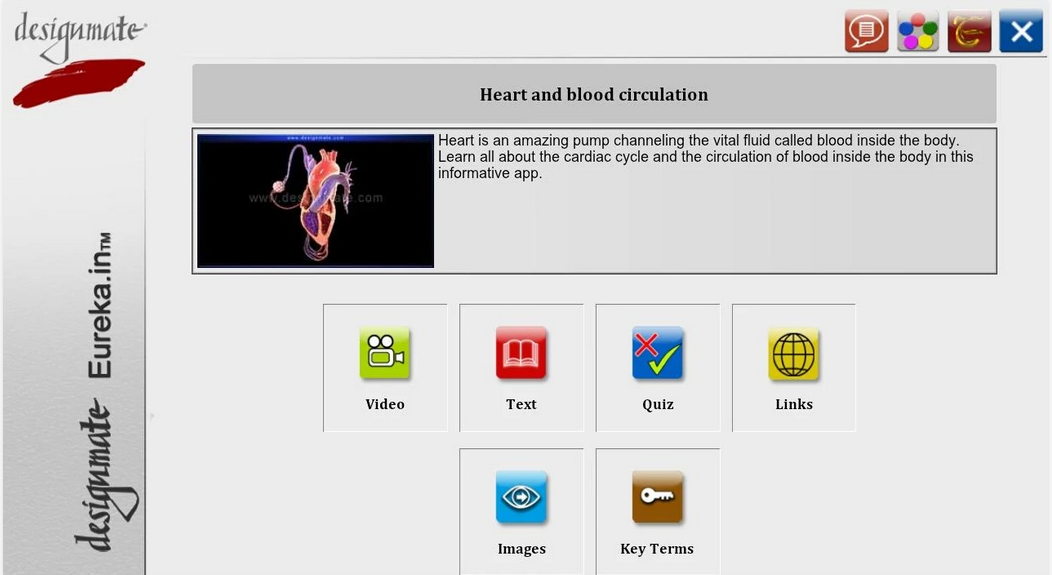
Apps such as Designmate’s Heart and Blood Circulation bring multimedia content, images, videos, screen readers, audio, quizzes with feedback, and key term glossaries together into one place. Students with cognitive processing difficulties can use the various media to enable them to access the biological content.

e-Bug is a digital learning environment that is animated and fun to navigate. Microbes are everywhere in the site and there are some very nice activities to do in and out of class. Quizzes and Games make this a great site for students with knowledge retention issues. The site is differentiated by the UK key stages; the earlier contact can be accessed by older students in order to help scaffold their knowledge.
Websites can be blocked, monitored for time, even keywords can be "turned off" during set times each day. If needed, you can set certain sites for time spent and add them to sets to block or unblock. Individuals that struggle to maintain concentration
Readers can control the text-to-speech in the books that MeeGenius is available for. The control offers students with processing disorders the chance to access the text at their own rate.
Students with Physical Difficulties
The virtual microscope benefits individuals with an array of difficulties. The site reads the the instructions and has a large image of a microscope that is easy to see. The instructions link with arrows and highlights to draw attention to the microscope. Individuals with limited movement but can access a mouse can learn to use the microscope.

Carolina’s digital microscopes have LED screens attached to the top of the device enabling the user to see the image of the slide without having to stand over the microscope; idea for wheelchair bound students. The microscope can be hooked up to a screen or projector to provide even larger viewing for those students who have trouble seeing the detail on the LED screen.
Google Voice allows students with motor skills impairments to access the search functionality of Google on a Chrome browser to enter search queries. The translation is remarkably accurate and is very fast.
Speak-It is a Chrome extension that reads multiple languages in male and female voices. German, French, Spanish, Italian, Russian, Chinese, etc.
This extension can be used for visually impaired individuals from these international backgrounds.
This extension could also be used to give Gifted and Talented language students listening tasks from native language web articles.
Students with Sensory Difficulties

Chromevox was developed by Google to provide accessibility tools native on the Chrome OS. It has a screen reader that can read single letters up to full paragraphs and is ideal for individuals with visual impairment. The speech can be altered in pitch and speed making the voice easier to listen to - lower pitch sounds older while higher sounds younger - the listener can choose the voice type they associate best with.
For unimpaired individuals that want to listen but can do so at a faster rate of speech, speeding up the speech can be achieved with this extension.
The page contains several links for webpage accessibility for the visually impaired. The page has been assessed at the highest level of high contrast colours.
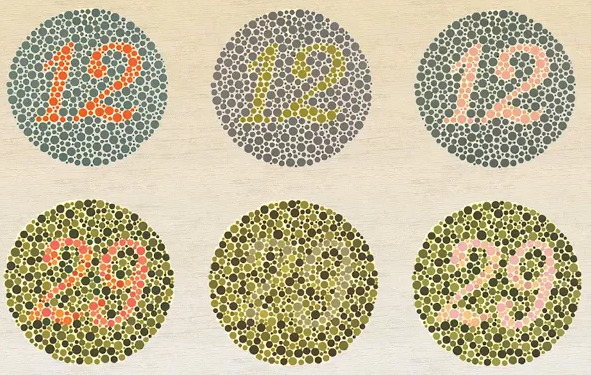
Daltonize is an extension that enhances colour contrast on webpages in order to allow colour blind individuals (tritanope, deuteranope and protanope) to tell the difference in colours. In the Biology class, this extension can also be used to simulate what colour blind individuals perceive; teachers can use the extension to develop material that use colours that work to generate the best contrast.
At-Risk Students
Careers

The ASPIRES site brings students into contact with careers in science. The lessons and activities are designed to give students the opportunity to see the possibilities beyond their immediate situation and motivate them to lift themselves out of their situation. The site has 11 case study lessons that help students take on the role of scientists.
Videos/TV shows and YouTube: Brainiac Science Abuse

There is much in science that cannot be replicated in the laboratory. Some Biology can be a bit “boring” and boredom can lead to misbehaviour by those students who, for whatever reason, are unable to focus in class. Targeted use of exciting media like Brainiac and Richard Hammond’s Miracles of Nature will help to allow troubled/at risk students focus and access the curriculum.
The N-Squad site by RICE university has a module on Alcohol and its effects on the body. This digital animated narrative can be used to engage students from lower socio-economic backgrounds that tend to resort to alcohol abuse. The site educates the learner enabling them to make informed choices in their real life. Alcohol, nicotine and other drugs are embedded in the National Curriculum for Key Stages 3, 4 and 5. While they are considered pastoral issues, the Biology teachers address the “mechanics” of the drugs in the Biology class.
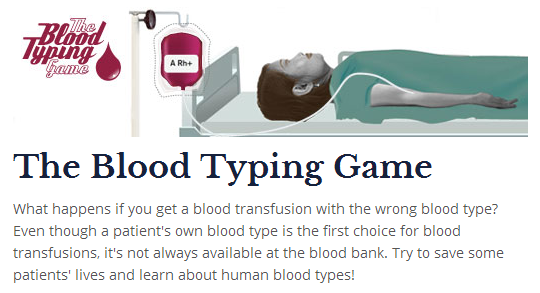
The Nobel prize site provides games and animations that students can use and play to follow in the footsteps of the Nobel Prize winners of the past. Some schools will not permit blood in the classroom which can make the topic of blood, which is potentially very interesting, rather boring. Interesting and engaging games such as those offered by NobelPrize.org may be just what the bored and distracted student needs to stay on task.
Zondle and IAmLearning


Zondle and IAmLearning are games platforms with Gamification and Games As Rewards mechanics built into them. Science and Biology lend themselves to the types of questions that are available in these platform and “At Risk” students may find these mechanics engaging, allowing them to access the curriculum in a fun way. Students may not realise they are learning while they play and the quizzes record and report to the teachers the students progress avoiding the need for stressful summative tests.
Gifted and Talented Students
Speak-It is a Chrome extension that reads multiple languages in male and female voices. German, French, Spanish, Italian, Russian, Chinese, etc.
This extension could be used to give Gifted and Talented language students listening tasks from native language web articles. It could also be used to assist students in their learning in a second language medium as the voices mimic stereotypical accents well for the language; assisting in the pronunciation of the written word.

This website provides engaging and challenging biology content including simulations, and videos, and online lab activities. Students with strong independent learning skills can access content from Stem Cells to Pharmacogenomics - the activities extend the classroom and allow G+T students take their studies to a university standard thus enhancing their breadth of knowledge at A-Level.
Tuesday, 29 April 2014
Accessibility features on Google Chrome
I am a big fan of Google's Apps. I am aiming at finding an app or extension for Chrome for all of my laptop related activities so that I don't need to rely on a particular platform in future. The extensions on Google Chrome seem to meet the needs I am looking for.
For this post, I have decided to look at the assistive technologies I can find for Google Chrome, Chrome OS and Chromebooks, along with apps/extensions that might be considered assistive. To start with, I tried some Speech-to-Text apps and voice recognition:
For this post, I have decided to look at the assistive technologies I can find for Google Chrome, Chrome OS and Chromebooks, along with apps/extensions that might be considered assistive. To start with, I tried some Speech-to-Text apps and voice recognition:
"I'm trying to test this speech to text app . I'm finding that i have to speak slowly, and pronounce my words very carefully or not recognise the words . speaking this lonely is quite difficult than i don't enjoy doing kama it is making process of getting information into the computer slower and harder than i would be normal the avengers persistently mess recognises my location of the world, c o m n s . I would like to be able to say delete and have the word you said be deleted i still have to use my hands to do that ."
The App that produced this result was Dictation.io; it struggled somewhat with my accent I think! I two things that amused me were: 1) it didn't recognise the word comma in a sentence, 2) didn't recognise period in regards to a lesson. In a effort to get the recognition to realise I didn't want a comma or full stop inserted, I tried to speak quickly through the sentence; this had an effect but the recogition began to struggle with the speed.
I tried saying the same sentences to Google's Voice Search and I found that the recognition here was much more accurate and could deal with my pronunciation!
The SpeakIt extension for Chrome was very impressive. I used it on the various language settings and speakers on the different languages on Wikipedia - I was convinced I was listening to native speakers of the language. Highlighting the text and letting the extension read could be used not only for individuals with visual impairments but for first and second language learners.
The Chromebook comes packaged with an accessibility toolkit called ChromeVox. This is another screen reader that can navigate the browsers menus and can be set to read each letter or the whole paragraph by tapping the keys. What I found most interesting about this app was that it allows the alteration of the speed and pitch of the voice; higher pitches sounded younger and faster speeds allowed the page to be read faster. Depending on preference of the listener for young/old and male/female, a listener can engage more or less based on an environmental predisposition for a voice allowing them to access the content better. Learners with processing speed issues can use the slower speech in order to allow that to access curriculum better. J.J. Meddaugh of the American Association for the Blind comments on Chromevox on the association's site"
"Overall, the browser is able to decipher and present a variety of webpages with relative ease, which is probably one of its strengths when it comes to accessibility."Clearly there is some room for improvement where full accessibility is concerned but Google are on their way to meeting the needs.
"ChromeVox could use some improvements in speaking notifications and progress bars as it often gives no feedback, which can lead to confusion and frustration."
These were the typical app types and extensions available but I am interested in colour blindness as at least one student in each year I have taught over the last 10 years has had the genetic condition in some form. From my investigations, Microsoft and Apple do not have specific colour blind accessibility options so having the ability to enhance Chrome with Daltonize seems useful. The extension can be applied to a webpage and it will enhance the contrast of the colours that each of the three main colour blindness types need in order to better see the differences in colours: protanope, deuteranope and tritanope. I visited various image and colour heavy sites and tried out the extension; my student will test it to see if it helps him!
References
Meddaugh, J.J. (2013). A First Look at the Accessibility of the Google Chrome Operating System. Retrieved from: http://www.afb.org/afbpress/pub.asp?DocID=aw140502
Tuesday, 22 April 2014
Integrating Technology into the Science Classroom: Obstacles and Solutions
I am a science and techie geek; there really isn't another way to describe me. As such, I am always trying out new tech on my students and making suggestions of different tech for them to try out; some are more than willing to give anything a go while others like to stick to what they know - sounds like some of the teachers I know!
For me, it comes down to the culture within the school. If the Head teacher and other Principals are tech advocates and push the use of technology, the teachers will do so too since those Principals will probably have employed staff that are likely to use tech to teach. If all the teachers are techie advocates, the students will come into contact with a positive attitude toward the use of tech and be willing to try new stuff. These observations are anecdotal from my own experience but that is what I have seen.
I teach a Y9 class, 4 GCSE classes, and 2 A Level classes. Of these classes, I get to see the Y9 students twice as much as the others and I like to try out a lot of new stuff with them. I have the time to give the students time to investigate the science problems I give them, indeed, I use inquiry based learning strategies as often as possible with these students and they get to play with dataloggers, laptops, iPads and iPods, and generally present their work however they want. My GCSE classes, on the other hand, only see me twice per week - there simply isn't time in the timetable to give them multiple lessons for each practical investigation.
I am about to teach a lesson on homeostasis and temperature control. Fortunately, I have assess to 12 dataloggers with a large array of probes. Last year, in a 50 minute lesson, I had to teach the students how to use the datalogger, have them use them to gather data and get the data off the devices. Tan et al. (2005) point out that in Singapore’s secondary schools and junior colleges, 84% of the 593 respondents ranked the time spent on setting up datalogging activities as the number one deterrent to the use of dataloggers. This year I will do things differently as I have adopted a Flipped model of teaching that I use particularly when it comes to practical lessons and the theory that surrounds them. As a result of flipping, I will have "made time" for practical skills in my teaching timetable and given my students more access to the dataloggers.
When I think about the dataloggers and when they arrived in the school, they turned up with no real instructions on their use. I had to take one home and play with it for hours to figure out all its functions. I use a Document Camera to show the students how to use it in class. For me, spending time out of school to help my teaching, and the learning of my students, is normal. If I find a problem with tech I will work at it until I solve it - I get a little obsessed which is why I only work with Google Apps Script on my holidays! Other teachers aren't prepared to give the time to learn new tech by themselves or simply can't do it by themselves - CPD most be considered before and after the introduction/integration of new technology. I know that using the dataloggers in my classes motivates the students to get involved in the practical activities as Le Boniec, Gras-Velázquez and Joyce (2012) provide evidence for in schools form all over Europe, but most apparently in the non-EU schools in Turkey.
I have become a big fan of the Tech PACK model. I aim to influence those members of staff around me to follow its process and identify their knowledge, pedagogical approach and their technology skills when they are planning lessons. If I had a technology coach when I started teaching, I wonder what I would be doing with technology now?
My point is that learning new technology takes time, support, perseverance and a desire to change when there are risks at hand such as the high stakes exams my GCSE and A Level students face.
Zinyahs, M. (2013) lists several obstacles similar to those I have encountered:
Spektor-Levi, Sonnenshein and Zion (2005) provide evidence that giving technology savvy science teachers access to complex education software without giving them adequate training results in the majority of teachers not using the technology. The authors go on to recommend that teachers are provided with "Training programs and inservice courses" and should be encouraged to use technical and social support to help integrate ICT in science. Social support is an important point and recent advances in our ability to create Personal Learning Networks makes our ability to get support so much more wide reaching. Hennessy, Ruthven and Brindley (2005) agree with this sentiment and offer these suggestions for solutions:
References:
M. Le Boniec, À. Gras-Velázquez & A. Joyce (2012). Impact of Data Loggers on Science Teaching and Learning. Retrieved from:
For me, it comes down to the culture within the school. If the Head teacher and other Principals are tech advocates and push the use of technology, the teachers will do so too since those Principals will probably have employed staff that are likely to use tech to teach. If all the teachers are techie advocates, the students will come into contact with a positive attitude toward the use of tech and be willing to try new stuff. These observations are anecdotal from my own experience but that is what I have seen.
I teach a Y9 class, 4 GCSE classes, and 2 A Level classes. Of these classes, I get to see the Y9 students twice as much as the others and I like to try out a lot of new stuff with them. I have the time to give the students time to investigate the science problems I give them, indeed, I use inquiry based learning strategies as often as possible with these students and they get to play with dataloggers, laptops, iPads and iPods, and generally present their work however they want. My GCSE classes, on the other hand, only see me twice per week - there simply isn't time in the timetable to give them multiple lessons for each practical investigation.
I am about to teach a lesson on homeostasis and temperature control. Fortunately, I have assess to 12 dataloggers with a large array of probes. Last year, in a 50 minute lesson, I had to teach the students how to use the datalogger, have them use them to gather data and get the data off the devices. Tan et al. (2005) point out that in Singapore’s secondary schools and junior colleges, 84% of the 593 respondents ranked the time spent on setting up datalogging activities as the number one deterrent to the use of dataloggers. This year I will do things differently as I have adopted a Flipped model of teaching that I use particularly when it comes to practical lessons and the theory that surrounds them. As a result of flipping, I will have "made time" for practical skills in my teaching timetable and given my students more access to the dataloggers.
When I think about the dataloggers and when they arrived in the school, they turned up with no real instructions on their use. I had to take one home and play with it for hours to figure out all its functions. I use a Document Camera to show the students how to use it in class. For me, spending time out of school to help my teaching, and the learning of my students, is normal. If I find a problem with tech I will work at it until I solve it - I get a little obsessed which is why I only work with Google Apps Script on my holidays! Other teachers aren't prepared to give the time to learn new tech by themselves or simply can't do it by themselves - CPD most be considered before and after the introduction/integration of new technology. I know that using the dataloggers in my classes motivates the students to get involved in the practical activities as Le Boniec, Gras-Velázquez and Joyce (2012) provide evidence for in schools form all over Europe, but most apparently in the non-EU schools in Turkey.
I have become a big fan of the Tech PACK model. I aim to influence those members of staff around me to follow its process and identify their knowledge, pedagogical approach and their technology skills when they are planning lessons. If I had a technology coach when I started teaching, I wonder what I would be doing with technology now?
My point is that learning new technology takes time, support, perseverance and a desire to change when there are risks at hand such as the high stakes exams my GCSE and A Level students face.
Zinyahs, M. (2013) lists several obstacles similar to those I have encountered:
- Limited technical support for ICT in the school.
- Having limited training of the school staff on ICT low number of computer in the school.
- Oldness or slowness of the system related to ICT in the system.
- Low level of training of the teachers and principals in the school.
- Low level of interest, drive and being open to change of the teachers and principals in the schools.
Zinyahs goes on to mention these possible solutions:
- ICT education should be included in the educational curriculum including the provision of necessary infrastructural support and massive training and deployment of skilled manpower into both secondary and tertiary institutions;
- Young software developers should be trained and supported with the necessary equipment to develop nationally usable science education software.
- The importance of youth participation in ICT decision making process cannot be over emphasized; therefore, their participation in ICT policy making processes at the national and other levels should be encouraged and supported by all stakeholders.
- To offer teachers opportunities for long-term collegial interaction involving critical reflection, sharing ideas, and research concerning the use of ICT
- To integrate ICT into schemes of work in ways which satisfy the NC and assist in meeting learning objectives but ensure that use is selective, appropriate and critical
- To take account of – and build up – pupils’ and teachers’ levels of technological expertise
- To constantly evaluate the unique contribution of ICT and its specific role in enhancing teaching and learning activity
References:
M. Le Boniec, À. Gras-Velázquez & A. Joyce (2012). Impact of Data Loggers on Science Teaching and Learning. Retrieved from:
http://files.eun.org/netbooks/ACER_Fourier_EUN_Science_pilot_report_2012.pdf.
Hennessy, S., Ruthven, K., & Brindley, S. (2005). Teacher Perspectives On Integrating ICT into Subject Teaching: Commitment, Constraints, Caution, and Change. Journal of Curriculum Studies,37(2), 155-192
Spektor-Levi, O., Sonnenschein, M., & Zion, M. (2005). Technology Integration in Science Studies - Obstacles and Incentives. Science Education International, 18 (3), 211-224.
Tan, K. C. D., Hedberg, J., Koh, T. S., & Seah, W. C. (2005). Datalogging in Singapore Schools:
Supporting effective implementations. Research in Science and Technology Education Journal; in
press.
Zinyahs, M. (2013). ICT Integration In Science Education In The 21 Cenury. Retrieved from: http://globaleducators.org/downloads/global_voice_of_educators/Journal%202012%20-%2030.pdf.
Hennessy, S., Ruthven, K., & Brindley, S. (2005). Teacher Perspectives On Integrating ICT into Subject Teaching: Commitment, Constraints, Caution, and Change. Journal of Curriculum Studies,37(2), 155-192
Spektor-Levi, O., Sonnenschein, M., & Zion, M. (2005). Technology Integration in Science Studies - Obstacles and Incentives. Science Education International, 18 (3), 211-224.
Tan, K. C. D., Hedberg, J., Koh, T. S., & Seah, W. C. (2005). Datalogging in Singapore Schools:
Supporting effective implementations. Research in Science and Technology Education Journal; in
press.
Zinyahs, M. (2013). ICT Integration In Science Education In The 21 Cenury. Retrieved from: http://globaleducators.org/downloads/global_voice_of_educators/Journal%202012%20-%2030.pdf.
Sunday, 20 April 2014
Privacy, Permissions and Digital Footprints
I have read many Acceptable Use and Social Media Policies and they come in various degrees of strictness and completeness. I believe that there needs to be a set of rules that are followed but also that everyone "buys in" to the concept of the policy and the guidelines within. I have recently developed a set of guidelines for the use of Google Apps for Education for my students. I presented them to a target group and have asked that they review them and discuss any improvements or to let me know if they are too strict; this has generated very positive feedback about the guidelines from my students. The policy below is for teachers. It was created as part of a collaboration so it encompasses input from perspectives that my teachers may not feel is right for them. I will request that my teachers are given time to review the content of any policy/guidelines as I have with my students since they are more likely to abide by the rules if they write them!
Monday, 14 April 2014
Relative advantage of using technology to make the content areas become more engaging, relevant and authentic
Over the past couple of weeks in the 541 course, choice of task has become available to me in regard to integrating technology into my lessons. As a Science/Biology teacher I looked at the science/maths option and thought "I've done this already...several times; not doing it again!", and so I have looked at the lesson options for Language/Arts and the PE/Creative Expressive Arts - I am glad that I did.
In the first instance the choice of task was important and I was reminded why I have been putting in the effort to give my students choice in the way they express themselves. The National Center on Universal Design (CAST, 2011) for Learning publishes guidelines for the application of choice for the learner to enhance their ability to learn. CAST's Principle III, Provide Multiple Means of Engagement, includes guidelines: 7 - Provide options for recruiting interest, 8 - Provide options for sustaining effort and persistence, and 9 - Provide options for self-regulation seem the most relevant to my work and I particularly like this point they make:
My colleagues and I have been enhancing our teaching schemes with #Takeawayhomework (based on @TeacherToolkit idea #100ideas), a "menu" of progressively more "spicey" work the students may choose to do. The idea being that may choose less spice but most eat more of it, or choose more spice but only eat one! The choice provides engagement as the students can design their own path through the content they need to access.
Some students don't talk much so finding out what makes them tick can be difficult. Finding really cool ideas that are relevant to each of my students and giving them the choice to complete what they want to complete has allowed me to witness more depth in these students in a much shorter time; I only teach one particular class two times per week. The recent cross content area lessons I have built have given me greater insight into the teaching with technology my extra-faculty colleagues get up to but also have given me better ways to engage my Biology students with tasks that they are interested in because they are more relevant to their interests.
For the lessons I designed for Language Arts I decided to build an eBook but with biology content. For Music, the biology students need to create a piece of "techno" music using heart and lung sounds. For PE, the students have to use Adidas MiCoach to create a running route in the shape of the circulatory system, then run it with the GPS tracking in the MiCoach App, speeding up and slowing down in the correct places. Finally, for Art, the students must create a blood themed piece of work based on the style of Jackson Pollock's drip art/action painting.
Authentic learning in science lessons can be reasonable easily achieved by the use of dataloggers for data collection, spreadsheets for analysis, and collaborating with other classes on write-ups and through webcasts (Roblyer & Doering, 2013). The authenticity of actually publishing one's work online for others to see and comment on is both a terrifying and very exciting and has an affect on self esteem (Sheldon, K. M., Abad, N., & Hinsch, C., 2011). Personally, I have only begun to really use personal networks like LinkedIn and Google+ recently to advertise myself as a professional; I have only been blogging for 10 months - the length of my MET course. I see the value in making my thoughts and work public - I do a better job - and this is the value of giving our students the opportunity to do authentic work like creating a eBook and getting feedback from the world on how to make it better. Working with classes from around the world on environment projects or joining the Globe Project:Globe Program or using a space telescope with an astronomer in the classroom through Telescopes in Education.
CAST (2011). Universal Design for Learning Guidelines version 2.0. Retrieved from: http://www.udlcenter.org/aboutudl/udlguidelines/principle3
In the first instance the choice of task was important and I was reminded why I have been putting in the effort to give my students choice in the way they express themselves. The National Center on Universal Design (CAST, 2011) for Learning publishes guidelines for the application of choice for the learner to enhance their ability to learn. CAST's Principle III, Provide Multiple Means of Engagement, includes guidelines: 7 - Provide options for recruiting interest, 8 - Provide options for sustaining effort and persistence, and 9 - Provide options for self-regulation seem the most relevant to my work and I particularly like this point they make:
the same learner will differ over time and circumstance; their “interests” change as they develop and gain new knowledge and skills, as their biological environments change, and as they develop into self-determined adolescents and adults.
My colleagues and I have been enhancing our teaching schemes with #Takeawayhomework (based on @TeacherToolkit idea #100ideas), a "menu" of progressively more "spicey" work the students may choose to do. The idea being that may choose less spice but most eat more of it, or choose more spice but only eat one! The choice provides engagement as the students can design their own path through the content they need to access.
Some students don't talk much so finding out what makes them tick can be difficult. Finding really cool ideas that are relevant to each of my students and giving them the choice to complete what they want to complete has allowed me to witness more depth in these students in a much shorter time; I only teach one particular class two times per week. The recent cross content area lessons I have built have given me greater insight into the teaching with technology my extra-faculty colleagues get up to but also have given me better ways to engage my Biology students with tasks that they are interested in because they are more relevant to their interests.
For the lessons I designed for Language Arts I decided to build an eBook but with biology content. For Music, the biology students need to create a piece of "techno" music using heart and lung sounds. For PE, the students have to use Adidas MiCoach to create a running route in the shape of the circulatory system, then run it with the GPS tracking in the MiCoach App, speeding up and slowing down in the correct places. Finally, for Art, the students must create a blood themed piece of work based on the style of Jackson Pollock's drip art/action painting.
Authentic learning in science lessons can be reasonable easily achieved by the use of dataloggers for data collection, spreadsheets for analysis, and collaborating with other classes on write-ups and through webcasts (Roblyer & Doering, 2013). The authenticity of actually publishing one's work online for others to see and comment on is both a terrifying and very exciting and has an affect on self esteem (Sheldon, K. M., Abad, N., & Hinsch, C., 2011). Personally, I have only begun to really use personal networks like LinkedIn and Google+ recently to advertise myself as a professional; I have only been blogging for 10 months - the length of my MET course. I see the value in making my thoughts and work public - I do a better job - and this is the value of giving our students the opportunity to do authentic work like creating a eBook and getting feedback from the world on how to make it better. Working with classes from around the world on environment projects or joining the Globe Project:Globe Program or using a space telescope with an astronomer in the classroom through Telescopes in Education.
CAST (2011). Universal Design for Learning Guidelines version 2.0. Retrieved from: http://www.udlcenter.org/aboutudl/udlguidelines/principle3
Edutopia (2008). Why integrate technology into the curriculum?: The reasons are many. Retrieved from: http://www.edutopia.org/technology-integration-introduction
Sheldon, K. M., Abad, N., & Hinsch, C. (2011). A two-process view of Facebook use and relatedness need-satisfaction: Disconnection drives use and connection rewards it. Psychology of Popular Media Culture, Vol 1(S), 2-15. doi: 10.1037/2160-4134.1.S.2
Roblyer, M. D. & Doering, A. H. (2013). Integrating Educational Technology Into Teaching. Upper Saddle River, NJ: Pearson
Sunday, 6 April 2014
Digital Learning Experience
I have been considering developing this Plant Growth Project for some time. From the perspective of an Instructional Designer, there was an identified need that required solving; my students need to engage with the Biology on a personal level and through the integration of their assessed course material, the use of real scientists like Prof. Dr. Normah, tech enhanced assessment, and redefinition of the classroom by using technology to visit places virtually that we cannot visit in real life. While I still need to incorporate some elements into the project, this iteration is certainly at a point where it can be released to my students and used. I have previously developed the Google Sheets used to record the students scores to present the students' assessed performances as Progress Charts for each of the skills, these need incorporating but I felt were beyond the scope of this particular project. Since the embedded GSite is the actual project my students will be using, any enhancement I make will appear here automatically. Visit the actual site here.
Friday, 4 April 2014
Cross Curriculum 3: Modern Foreign Languages
It makes sense as a curriculum coordinator to identify cross-over between subjects. This can lead to collegial interaction and team planning to enhance the curriculum for the students. Bringing teachers together to team plan and teach a common concept across subjects seems like a good idea, allowing teachers to come into contact with different teaching and delivery styles can only be a good thing, right? Philips, Lancaster and Cooper (2014) describe research that indicates to the benefits of team teaching but highlights challenges when it comes to the formation of successful teacher teams. Concerns of different delivery style, pedagogical approaches and even classroom management have been challenges.
While I didn't get a chance to tam plan or team teach this lesson, the Head of French did review the lesson and thought it would be good to teach and would work for her content and students.
Phillips, M. (2014). Team teaching with technology: upsetting the TPACK applecart. Retrieved from http://acec2014.acce.edu.au/sites/2014/files/drafts/Team%20teaching%20with%20techonology.%20Upsetting%20the%20TPACK%20applecart.pdf.
While I didn't get a chance to tam plan or team teach this lesson, the Head of French did review the lesson and thought it would be good to teach and would work for her content and students.
Content Area:
Modern Foreign Languages (French) Environment theme / Biology Ecology and the Environment
Title:
L'environnement
Grade Level or Target Group:
Y10/11 iGCSE
Pre Planning
Big Idea(s):
- develop understanding and use of written and spoken forms of the target language, in a range of familiar and practical contexts, and for a variety of purposes
- develop the ability to communicate effectively in the target language through speaking, using a range of vocabulary and structures
The specification also states that students should be able to listen, speak and write about the modern world and the environment.
Topic area D refers to “The modern world and the environment”. Students may communicate about: Current affairs and social issues, Environmental issues, The media (eg TV, film, radio, newspapers), Information and communication technology (eg
internet, mobile phones, email).
The iGCSE Biology specification refers to Human Impacts on the Environment. The students have impacts they should know about and in the context of the MFL cross-over, may choose which is appropriate.
Section 4 - d) Human influences on the environment
Students will be assessed on their ability to:
- 4.11 understand the biological consequences of pollution of air by sulfur dioxide and by carbon monoxide
- 4.12 understand that water vapour, carbon dioxide, nitrous oxide, methane and CFCs are greenhouse gases
- 4.13 understand how human activities contribute to greenhouse gases
- 4.14 understand how an increase in greenhouse gases results in an enhanced greenhouse effect and that this may lead to global warming and its consequences
- 4.15 understand the biological consequences of pollution of water by sewage, including increases in the number of micro-organisms causing depletion of oxygen
- 4.16 understand that eutrophication can result from leached minerals from fertiliser
- 4.17 understand the effects of deforestation, including leaching, soil erosion, disturbance of the water cycle and of the balance in atmospheric oxygen and carbon dioxide.
For the purposes of this lesson, the students will be given links to websites with specific environmental issues. They will also be given the opportunity to search for their own interests; this choice will produce differentiation in the task.
Websites from Canada are written for French and English and will be assigned to those students who require support. Sites from France are in French only and will be assigned to the more proficient language students.
Essential Questions:
What environmental issue are you interested in?
What are the issues that concern you / What are the effects of the issue?
What are scientists in doing about it?
Objective:
Given access to various French language websites for information, students will create a VoiceThread news report of no more than 5 minutes, or a written paragraph / poster of no more than 150 words, that answer the essential questions, while including relevant vocabulary for the environment topic.
Summative Assessment:
Students will submit their objects for peer and teacher assessment. Results of quizzes will be used to assess progress in the lesson.
Lesson Opening
Students will be presented with the topic title and objectives.
As a plenary activity, students will complete the quiz
Lesson Body
Students access one of the following sites. They will listen to or read the content aiming to summarise the content of the articles/videos, identifying the environment related terminology.
Musee Virtuel Canada: http://www.especesmenacees.ca/fr/pollution.php
(most relevant to Biology specification)
Government of Canada Science site:
Sites from France:
- La Recherche: http://issuu.com/larecherche - This site has multiple publications of different science topics. Students may search for something they are particularly interested in.
- La Recherche: http://www.larecherche.fr/savoirs/dossier-special/nitrates-controle-01-07-2008-89222 - This special edition is specifically about nitrates and their effects on the environment. Students should start with this if they are not confident.
- La Recherche: http://issuu.com/larecherche/docs/feuilletage_n__472 - this edition has a good article on climate change.
- French newspaper with science section: Le Monde: http://www.lemonde.fr/sciences/
Students proceed to write their own environment related object using the language they have found.
Check for Understanding: Students begin by working their way through the GCSE Bitesize Revision and Test Bite: http://www.bbc.co.uk/schools/gcsebitesize/french/listeningh/h05_list_environment_rev1.shtml
Extended Practice: (Authentic assessment)
Students will enter the Language Perfect competition. http://start.languageperfect.com/
Lesson Closing:
Students will be given a choice of Quizlet quizzes to complete based on their language skills. First language French students, Gifted and Talented and students targeted A/A* will be assigned the harder quizzes.
Vocabulary
Sentences:
Materials needed for this lesson:
SMARTBoard and Projector, Students personal devices/iPods/iPads/Laptops, Headphones/microphones, Wifi access.
Phillips, M. (2014). Team teaching with technology: upsetting the TPACK applecart. Retrieved from http://acec2014.acce.edu.au/sites/2014/files/drafts/Team%20teaching%20with%20techonology.%20Upsetting%20the%20TPACK%20applecart.pdf.
Subscribe to:
Posts (Atom)